
Free broken link checker, no sign-up
Broken link checker: find every dead link on your website
Enter your home page. The checker crawls your whole site, tests every link and image on every page, internal and external, and lists the broken ones with the page each is on, the link text and the line it sits on. Results appear as it works, and the list exports to PDF, Word, CSV or plain text.
Free. Up to 200 pages per check. No account and no email address needed.
What the broken link checker finds
Check broken links, images and redirects across a whole website
A dead link checker that tests one page tells you very little. Broken links pile up on old blog posts, in footers nobody reads, and on pages that were renamed years ago. This one starts at your home page, follows every internal link and reads your XML sitemap, so pages that no menu reaches are checked too.
Broken internal links
Links between your own pages that return 404, point at a page you deleted, or redirect somewhere that no longer exists. These are the broken links you can fix today, and the ones that waste Google’s time on your site.
Dead external links
Links to other websites that have moved, removed the page, or let their domain expire. A reference to a government page or a news article from 2013 is the most common kind, and each one sends a reader to an error page.
Broken images
Images whose file is missing, usually after a migration or a media library clean-up. Lazy-loaded images are read from their real source, not the placeholder the page starts with, so they are checked like any other image.
Redirect chains
Every redirect is followed to the end and each hop is shown. Links that still work through a redirect are listed separately, with the address they end on, so you can point them straight at it.
Invalid links
Links that could never work: a file:// address copied from someone’s own computer, a link written without its domain, or a mistyped http. The link is shown exactly as it was written in the page, so you can find it.
Where each link is written
Every result names the page, the part of the page (content, menu, footer or sidebar), the source line and the HTML that holds the link. A broken link in the footer shows as one fix, not three hundred.
The results table can be sorted by any column, searched, and filtered to internal or external links and to links or images. Copy the list into an email, or export it as a PDF, a Word document, a CSV file for Excel or plain text. To check how well the pages themselves are built, use the free SEO checker, and to find out where a site is hosted, the free hosting checker.
Step by step
How to check a website for broken links
Finding broken links on a website takes a few minutes and needs no login, plugin or access to the site.
- Enter the home page address. Type or paste it into the broken link checker above, with or without https:// and www.
- Press Find broken links. The checker reads the home page, robots.txt and the XML sitemap, then crawls the site page by page. The counters show how many pages and links it has processed so far.
- Read the Broken tab as it fills. Each row gives the broken link, its link text, the page it is on and the status it returned. Open Details to see every page the link appears on, with the line number.
- Export the list and fix the links. Download the results as a PDF or Word document for whoever edits the site, or as a CSV file to work through in a spreadsheet.
A site of fifty pages usually finishes in under a minute. A site of five hundred pages with thousands of outside links can take ten minutes or more, because every one of those links is a real request to another website, and the checker keeps its pace polite. The report stays at its own address for 48 hours, so you can close the tab and come back to it.
Why the result is accurate
A dead link checker that does not cry wolf
The usual complaint about broken link checkers is a list full of links that work. You open them one by one and they load. That happens when a tool believes the first answer it gets, and plenty of servers give automated checkers a different answer from the one they give people.
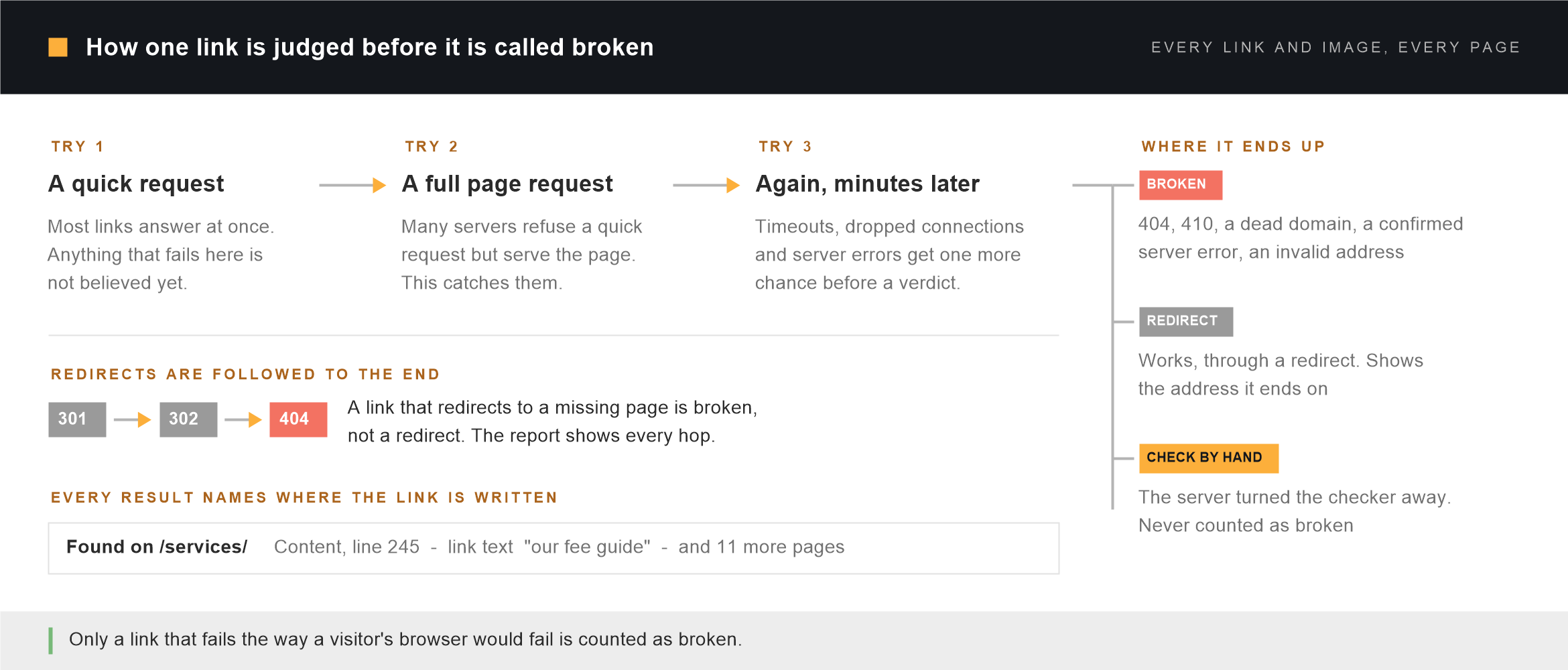
A failed quick check is never the answer
Each link is first tested with a quick request that does not download the page. Many servers refuse that kind of request, or answer it with an error, while serving the page normally to a browser. So any link that fails the quick test is requested again in full before anything is reported. Most false alarms from other link checkers end here.
One timeout is not a broken link
Servers have slow moments. A link that times out, drops the connection or returns a server error gets one more try at the end of the check, at least twenty seconds later. Only a link that fails again is reported, and a server error that repeats is marked as confirmed twice.
Blocked is not the same as broken
Sites such as Facebook, LinkedIn, Forbes and many legal and news publishers turn away automated requests with a 403, a 429 or a security challenge, while their pages load fine for readers. Those links are listed in their own tab, Check by hand, and never counted as broken. Open each in your browser: if it loads, nothing needs doing.
Redirects are followed to the last hop
A 301 on its own tells you nothing. The checker follows each redirect to where it finally lands. A link that redirects to a working page is a redirect worth tidying. A link that redirects to a missing page is broken, and is reported with the whole chain, for example 301 → 404. A deep link that redirects to a site’s home page is flagged too, because that is usually a removed page.
Soft 404s are caught
Some sites show a “page not found” message with a 200 status, so a simple checker calls the page fine. Before crawling, the checker asks your site for an address that cannot exist and remembers what comes back. Any page that turns out to be that same not-found page is reported as a soft 404.
Read the results
What each broken link status means, and what to do
Every row carries a status and one sentence explaining it. These are the ones you will see most often.
| Status | What it means | What to do | Counted as |
|---|---|---|---|
| 404 Not Found | The page does not exist at that address. | Link to the page’s new address, or remove the link. For your own pages, add a 301 redirect from the old address. | Broken |
| 410 Gone | The page was removed on purpose. | Remove the link or replace it with a current source. | Broken |
| 301 → 404 | The link redirects, and the address it ends on is missing. | Find the page’s current address and link to it directly. | Broken |
| 500, 502, 503 confirmed twice | The server failed, and failed again when checked later. | For your own site, check the error log. For another site, replace the link if it stays down. | Broken |
| Domain does not exist | The domain is not in the DNS at all, usually because it expired. | Remove the link. An expired domain can be bought by anyone, including spammers. | Broken |
| Invalid link | The address is malformed or points at a file on someone’s computer. | Edit the link in the page; the exact text is shown. | Broken |
| Soft 404 | The page answers 200 but shows your not-found page. | Restore the page, redirect the address, or make it return a real 404. | Broken |
| 301 → 200 | The link works through a redirect. | Update the link to the final address shown. | Redirect |
| 403, 429, 999 Blocked the checker | The server refused an automated request. | Open the link in a browser. If it loads, leave it. | Check by hand |
| Timed out | The server did not answer on two tries minutes apart. | Try it in a browser later; replace it if it stays unreachable. | Check by hand |
| Certificate error | The site’s security certificate failed verification. | Browsers will warn visitors. Link to a different source, or tell the site owner. | Check by hand |
Why it matters
What broken links cost a website
- Visitors leave. A reader who follows a link to an error page has been told the site is not looked after. On a service business’s website that is the moment a potential client decides to look elsewhere.
- Google spends its visit on dead ends. Every internal link to a missing page is a request Googlebot makes and gets nothing from. On a large site, that is time not spent finding your new and updated pages.
- Links stop passing value. An internal link to a page that moved, without a redirect, no longer tells Google which of your pages matter. Pointing it at the current address restores that.
- Expired domains become someone else’s. A link to a site whose domain lapsed now sends your readers to whoever bought it. We have seen a former client’s domain turn into an online gambling site.
- Missing images make pages look broken. A blank box where a product photo or a diagram should be reads as a fault, even when the text around it is fine.
- Redirect chains slow pages down. Each hop is another round trip before the page starts loading. Linking straight to the final address removes the wait.
Fixing them
How to fix broken links in WordPress
Work through the Broken tab from the top. Sort by the Found on column to group the links by page, so each page is opened and edited once.
- Fix the menu and footer links first. A broken link in a template appears on every page. The Details panel shows its location as Menu or Footer; edit it once under Appearance, in the Site Editor or in your theme’s settings.
- Update links inside posts and pages. Open the page named in Found on, find the link text shown in the report and change the address. For a link used on many pages, a search-and-replace tool changes them all at once; take a backup first.
- Redirect your own moved pages. When the missing page is one of yours that changed address, add a 301 redirect from the old address to the new one, for example with the free Redirection plugin. That fixes old links on other websites and in Google at the same time.
- Replace or remove dead outside sources. Search for the page’s new address. If it is gone, link to a current source or remove the link, and keep the sentence around it making sense.
- Run the check again. The Broken tab should now be empty, and anything still listed tells you what was missed.
A link-checking plugin that runs inside WordPress does the same job on a schedule, but it does it on your own server, and on shared hosting that background work can slow the site for visitors. Checking from outside every month or two, and after any migration or redesign, gives the same answer without that cost.
WordPress help
Broken links after a move, a redesign or a hack
A long list of broken links usually has one cause behind it. Unique Smartweb is a WordPress engineering studio, and these are the jobs that most often start with a report like this one.
Links broken by a migration
Images still pointing at the old domain, pages whose addresses changed, and a new permalink structure with no redirects. Every old address is mapped to its new one and checked. WordPress migration starts at $299.
Links you did not add
External links to pharmacy, gambling or loan sites that nobody on your team wrote are a sign the site has been hacked. Malware removal starts at $199 and includes closing the way in.
Keeping links from breaking again
A monthly link check with the fixes made, alongside updates tested on a staging copy, off-site backups and uptime monitoring. Maintenance and care starts at $149 a month.
Every job starts with a free written audit and one fixed price in US dollars, not a sales call. Our hours overlap US Eastern, UK and Australian business days. We work on WordPress sites only; for a site on another platform we will tell you so rather than take the job.
Limits
Links the checker cannot verify
The checker sees your site the way a first-time visitor does, which sets some honest limits on what it can tell you.
- Pages behind a login. Member areas, customer accounts and anything that needs a password are not crawled, so links inside them are not checked.
- Links added by JavaScript after the page loads. The checker reads each page’s HTML. Links that only appear once a script runs, such as some sliders and search results, are not seen.
- Sites that refuse automated requests. These are listed under Check by hand with the reason, because a result the checker cannot confirm is not a result to act on.
- Pages past the 200-page limit. On a larger site the first 200 pages are crawled and the report says how many more were found. There is a ceiling on links as well, and the report says when it was reached. Links in shop filters and sorting options are checked but not followed, so a store’s allowance is not used up on copies of the same page.
Questions
Broken link checker questions
Is this broken link checker free?
Yes, with no account and no email address. Each check covers up to 200 pages, and there is a limit of ten checks an hour from the same connection, because every check makes real requests to your site and to the sites it links to.
How do I find broken links on my website?
Enter your home page in the checker at the top of this page and press Find broken links. It crawls the site, tests every link and image, and lists the broken ones with the page each is on and the link text, so you know exactly where to go to fix it.
Does it check external links as well as internal ones?
Yes. Every link on every crawled page is tested, whether it points at your own site or at another one, and every image too. Use the filter above the results to show only internal or only external links.
Why does a link that works in my browser show under Check by hand?
Because that server turned away the checker. Many large sites answer automated requests with a 403, a 429 or a security challenge while serving people normally. Those links are kept out of the broken count on purpose. If one opens in your browser, it is fine.
Why does this checker find a different number of broken links from another tool?
Usually because other tools count blocked links and one-off timeouts as broken, or stop at a redirect without following it. This checker confirms each failure with a full request, retries timeouts and server errors later, follows every redirect to the end, and lists refusals separately. It can also find more, because it reads your XML sitemap and checks images.
How long does a broken link check take?
A small site takes under a minute. A site of several hundred pages with many outside links usually takes five to fifteen minutes. The counters show progress as it goes, and broken links appear in the table as soon as they are found.
Can I close the page while the check runs?
Yes. The check pauses while the page is closed, and continues from where it stopped when you open the same address again. The report is kept for 48 hours at that address, so bookmark it if you want to come back to the results.
Can I export the list of broken links?
Yes. The Copy / Export button copies the table to your clipboard, or downloads it as a PDF, a Word document, a CSV file for Excel or Google Sheets, or plain text. The file contains exactly the rows on screen, with your filters and sort order.
Will checking my site slow it down?
No. The checker requests at most a few pages from your site at a time, and slows down further if your server asks it to. It runs on our server, not yours, so nothing is installed and nothing keeps running once the check ends.
Does the broken link checker work on sites that are not WordPress?
Yes. It reads pages the way any visitor does, so it works on any public website, including Shopify, Wix, Squarespace and hand-built sites. The advice on this page about fixing links is written for WordPress.
What is the difference between a 404 and a soft 404?
A 404 is a page that tells browsers and Google plainly that it does not exist. A soft 404 shows a not-found message but answers “200 OK”, so it looks like a real page to software. Google treats soft 404s as missing and reports them in Search Console, and this checker reports them as broken.
Should I fix redirects as well as broken links?
Broken links first. Redirects still work, so they are lower priority, but internal links that go through a redirect are worth pointing at the final address: each hop adds a delay, and a chain of several can stop search engines following it. The Redirects tab shows the address to use.
How often should I check my website for broken links?
Every month or two for an active site, and straight after any migration, redesign, domain change or large content clean-up, which is when links break in bulk. Sites that link to a lot of outside sources lose links over time even when nothing on them changes.
Is anything stored when I run a check?
The results are kept for 48 hours so the report can be reopened, then deleted. We also keep a list of which websites were checked and from which country, without your IP address, for 90 days. The privacy policy describes both.
Found the broken links. Want the rest of the site checked?
Send us the address and we will write a free audit of the whole site: every problem we found ordered by what it costs you, what we would do about each one, the warnings you can safely ignore, and one fixed price in US dollars agreed before anything starts. It comes back as a document. There is no sales call.