
Free hosting checker, no sign-up
Hosting checker: find out who is hosting any website
Enter a website address to check its hosting provider, the server network it runs on and any CDN such as Cloudflare in front of it. The website host checker also shows what the site is built with, its WordPress theme and its domain registrar. Every answer is looked up live and marked Confirmed, Likely or Not detectable, so you know how sure it is.
Free. No account and no email address needed.
What the hosting checker shows
Check a website’s hosting provider, server and platform in one table
Most website hosting checkers return a single company name and leave you to trust it. This one gives three short sections and puts a label on every answer. Confirmed means it was read directly from the site, its DNS or the official registry. Likely means strong indirect evidence rather than a direct reading. Not detectable means the information is not public, and the table says so rather than guessing.
The hosting
The hosting provider the site is on today, and the server network behind it. Whether a CDN or firewall such as Cloudflare stands in front. Managed WordPress hosts such as WP Engine, WordPress.com and WPMU DEV are named by their own signatures, and hosting brands that share one network, such as HostGator and Bluehost, are told apart by the server itself.
The website
What it is built with: WordPress, Shopify, Wix, Squarespace, Webflow, Joomla, Drupal, Ghost, Next.js and others, with the version where the site publishes it. On WordPress, the theme by its real name, its parent theme if it is a child theme, and the page builder, from Elementor and Divi to the block editor.
The domain
The registered domain name, the registrar it is held with, and the date it was first registered, with its age. All of it is read from the official registry’s own record at the moment you check, not from a copy.
The finished table has a copy button, so the whole answer can be pasted into an email or a quote as plain text. If you want to know how well a site is built rather than where it is hosted, the free SEO checker reads up to twenty of its pages and reports what it finds. To find dead links and missing images, use the free broken link checker.
Step by step
How to find out who is hosting a website
Checking a website’s hosting provider takes under a minute. You do not need access to the site, a login or any technical tools.
- Enter the website address. Type or paste it into the hosting checker above, with or without https:// and www. Any page of the site works.
- Press Check this website. The checker looks up the site’s DNS, the registry record for its server network and the site’s own response, at that moment. It usually takes five to ten seconds.
- Read the Hosting company row. That is the hosting provider. The Server network row shows the company that owns the servers, which can be a cloud platform the host rents from.
- Check the CDN row. If Cloudflare or another CDN is listed, the site’s real server is hidden behind it. The label on the Hosting company row tells you whether the host was still found.
Checking website hosting by hand
You can piece the answer together yourself, but each manual method answers a different question. A WHOIS lookup shows the domain registrar, which is where the name was bought, not where the site is hosted. The nameservers show who runs the DNS. An IP lookup shows who owns the network the address belongs to, and for any site behind Cloudflare that is Cloudflare rather than the host. The hosting checker runs these lookups together, compares them, and adds the clues that get past a CDN.
Why the result is accurate
A website host checker that shows today’s host, even behind Cloudflare
The most common complaint about hosting lookup tools is that they name the wrong company. A site moved hosts last spring, and the lookup still shows the old one. That happens because those tools answer from a database built by crawling the web months ago.
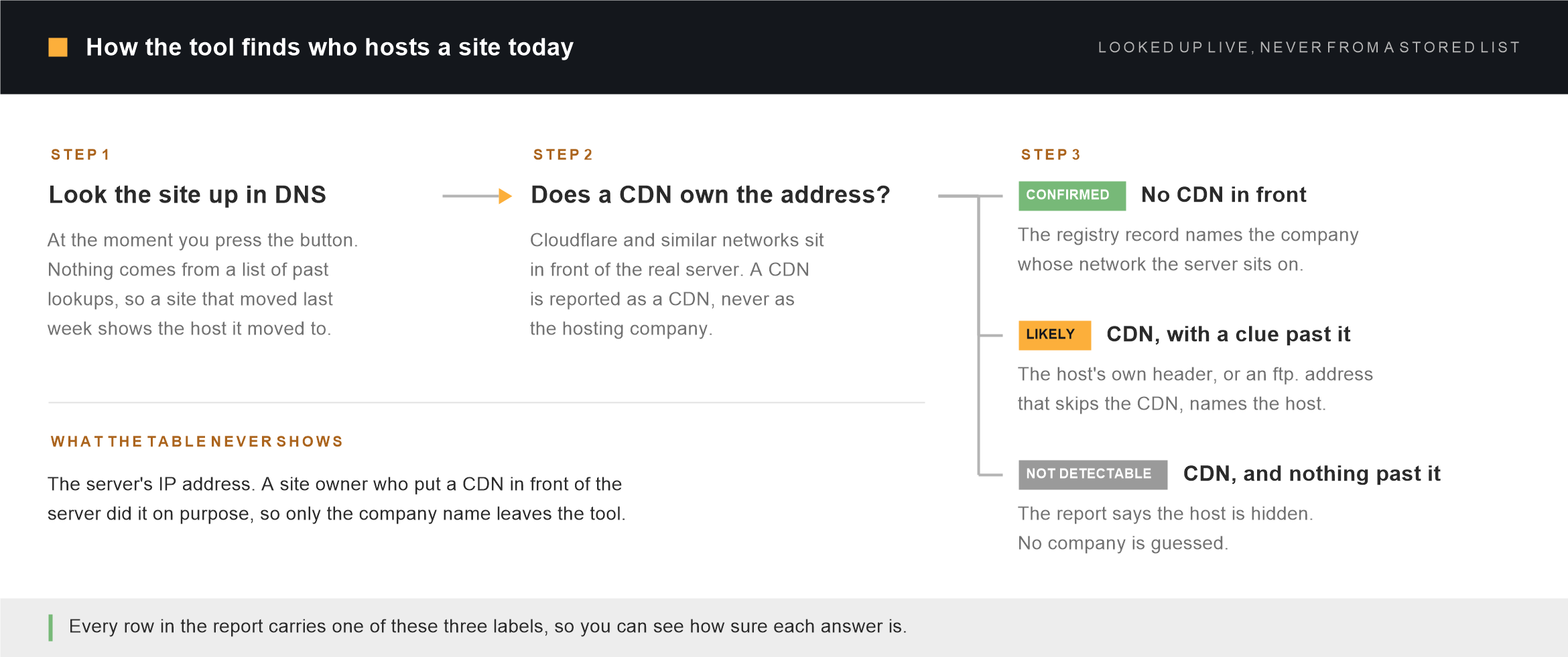
This hosting checker keeps no database of past lookups. When you press the button, it asks three questions at that moment: where the site’s address points in DNS, which company the official registry says owns that network, and what the site’s own server says about itself. A site that moved yesterday shows the host it moved to, because the answer is only a few seconds old.
Why Cloudflare is never reported as the hosting provider
A large share of websites sit behind Cloudflare or a similar network. Visitors connect to Cloudflare, and Cloudflare passes each request on to the real server somewhere else. Look up such a site’s address and you find Cloudflare’s network, not the host’s, so many hosting checkers print “Hosting: Cloudflare”. That is wrong: Cloudflare stands in front of the server without running it.
Here a CDN is reported in its own row. The hosting provider is then named only if a public clue gets past it, such as a header the host adds to every page, or an address like ftp. or cpanel. that is not behind the CDN and points at the real server. When a clue like that exists, the host is named and marked Likely. When there is none, the row says the host is hidden and names nobody.
The server’s IP address is never shown, even when a clue reveals it. A site owner who put a firewall in front of their server did it on purpose, and a public tool should not hand out the address that walks around it.
HostGator, Bluehost and other brands on the same network
Several hosting brands can share one server network. HostGator and Bluehost both belong to Newfold Digital and run on its Unified Layer network, so the registry record alone cannot tell them apart. Once the checker has found the real server, it reads the security certificate and hostname that server presents, which usually name the brand. That is how a site on a HostGator server is named as HostGator, and a Bluehost site as Bluehost, rather than as a list of possible brands.
The network and the hosting company are not always the same
Plenty of hosting companies rent their servers from a larger cloud provider. A site can be run by a managed WordPress host while its server sits on Google Cloud, Amazon Web Services or Vultr. Where the host leaves a signature, both are shown: the company you pay in the Hosting company row, and the network underneath in the Server network row. Where it does not, the table names the cloud network, which is as far as the public evidence goes.
Know who does what
What each hosting checker result means, and who to contact
A website can involve up to four different companies: the hosting provider, the server network, a CDN and the domain registrar. Each is responsible for a different part of the site, and mixing them up is the usual reason people spend a day talking to the wrong support desk. The table shows what each result tells you and when that company is the one to call.
| Result | What it tells you | Contact them when | Common examples |
|---|---|---|---|
| Hosting provider | The company whose server stores and runs the website, and the account that is billed for hosting. | The site is down, shows server errors, has been suspended, or you need the hosting login back. | WP Engine, Bluehost, HostGator, WordPress.com |
| Server network | The company that owns the network the server sits on. Often the host itself, sometimes its parent company or a cloud platform it rents from. | Rarely. Your hosting provider deals with the network on your behalf. | Google Cloud, Amazon Web Services, Vultr |
| CDN or firewall | A network in front of the server that caches pages and filters traffic. It hides the server’s address from visitors. | Some visitors see errors that others do not, pages show an old version after an update, or real visitors are being blocked. | Cloudflare, Fastly, Akamai |
| Domain registrar | Where the domain name is registered and renewed. It controls the name, not where the website is stored. | The domain has expired or is about to, you want to transfer it, or you need to change where it points. | GoDaddy, Namecheap |
A domain can be registered with one company, sit behind a CDN run by a second and be hosted by a third, and none of them can see or fix the others’ part. When it is not clear which of them is at fault, run the hosting checker first, then start with the company whose part matches the symptom.
When you need it
Why people check website hosting
- You inherited a website and nobody knows where it lives. A previous developer or agency set it up and the logins left with them. The hosting checker tells you which company to contact to recover access.
- The site is down and you need the right support desk. Knowing whether the problem sits with the host, the CDN or the registrar saves hours of being passed between them.
- You are planning a move to better hosting. Knowing the current host tells you what you are moving away from. Moving a site without downtime is WordPress migration, a job we do from $299.
- You want to know what a competitor uses. A fast competitor on a managed WordPress host is useful information when you choose your own hosting.
- You are buying a website or hiring an agency. Checking the hosting provider and the platform before you sign confirms what you are being told.
- You need to report abuse or a phishing page. The hosting provider is the company that can take a page down, and most publish an abuse contact on their own website.
Coverage
Hosting providers the checker recognises
Any public website can be checked. The companies below were each seen on real websites while the checker was built, and are named directly. Any other hosting provider is shown by the name on its network’s registry record, which for most independent hosts is the company itself.
Managed WordPress and site builders
- WP Engine
- WordPress.com and Pressable
- WPMU DEV Hosting
- BigScoots
- Shopify, Wix and Squarespace
- Vercel, Netlify and Ghost(Pro)
Shared hosting brands
- HostGator and HostGator India
- Bluehost and Bluehost India
- FastDomain
- IONOS
Cloud platforms and CDNs
- Amazon Web Services and Google Cloud
- Vultr, Hetzner and OVHcloud
- Cloudflare, Fastly and Akamai, reported as CDNs
Some managed WordPress hosts run on a cloud platform and leave no public signature the checker can read. For those sites the result names the cloud network, such as Google Cloud, rather than guessing which host is renting it.
Hosting help
Meet the hosting experts at Unique Smartweb
Finding the host is usually the first step, not the last. Unique Smartweb is a WordPress engineering studio, and hosting problems are much of what we fix: sites that need to move, domains that need to change, servers that keep falling over, and hosts that insist the fault is somewhere else.
Hosting migration
Move to a new host with no downtime. The site is built and tested on the new server before DNS changes, email records are carried across, and the old host stays live for forty-eight hours as a rollback. WordPress migration starts at $299.
Domain and HTTPS changes
Moving a site to a new domain or onto HTTPS without losing rankings. Every old address is redirected to its new one and checked line by line, and the change of address is filed in Search Console. The price is fixed in the free written plan before anything is touched.
Site down or suspended
Server errors, a database connection error, a white screen after an update, or an account the host has suspended. Sites that are down or suspended are looked at the same day when you say so in your message. If the cause is malware, malware removal starts at $199.
Slow hosting
Before you pay for a bigger hosting plan, we measure where the time actually goes. Often the slowness is in the site, not the host, and moving would not fix it. Speed optimization starts at $349.
Dealing with your host
Hosts often blame the website, and developers often blame the host. We read the error logs, find which side the fault is on, and give your host’s support team the exact evidence they need to act on it.
Ongoing hosting care
Updates tested on a staging copy first, backups held off your server, uptime checked every minute and a monthly report, so hosting problems are caught before visitors notice. Maintenance and care starts at $149 a month.
The client sites on our work page run on hosts including WP Engine, WordPress.com, WPMU DEV Hosting and BigScoots, so the control panels, limits and support processes of the common hosts are familiar ground. We work inside your own hosting and domain accounts and hand back full access. Our hours overlap US Eastern, UK and Australian business days, and every job starts with a free written audit and one fixed price rather than a sales call.
We work on WordPress sites. For a site on Shopify, Wix or Squarespace, the hosting is part of the platform and cannot be moved separately, and we will tell you that rather than take the job.
Questions
Hosting checker questions
How do I find out who is hosting a website?
Enter the address in the hosting checker at the top of this page and press Check this website. The Hosting company row shows the provider, the Server network row shows who owns the servers, and the CDN row shows whether something like Cloudflare stands in front. It is free and takes a few seconds.
Is this hosting checker free?
Yes, with no account and no email address. There is a limit of twenty checks an hour from the same connection, so the tool cannot be used for bulk scanning. The same address checked again within ten minutes reuses the first answer, and the table says when it was checked.
How accurate is the website hosting checker?
Every answer is looked up live, so it reflects where a site is hosted today rather than months ago. Each row is labelled: Confirmed answers come straight from the site, its DNS or the registry, and Likely answers come from strong indirect evidence. When the host genuinely cannot be seen, the row says Not detectable instead of guessing, so a name the checker is not sure of is never presented as certain.
Can you check website hosting if the site uses Cloudflare?
Often, yes. Cloudflare hides the real server, so the checker looks for public clues that get past it, such as a header the host adds or an ftp. or cpanel. address that points straight at the server. If it finds one, the host is named and marked Likely. If there is none, the row says the host is hidden behind Cloudflare.
Why does another hosting checker show a different host?
Usually because it is answering from a stored database, and the site has moved since that database was built. Sometimes because it names Cloudflare, which stands in front of a site without hosting it. This tool looks everything up at the moment you check, so it shows where the site is today.
Is the domain registrar the same as the hosting provider?
No. The registrar is where the domain name was bought and is renewed. The hosting provider runs the server the website lives on. They can be the same company, but often are not: a domain bought at GoDaddy can point to a site hosted anywhere. The checker shows both, in separate rows.
How do I find out where my own website is hosted?
Enter your own address. If the result is a company you do not recognise, search old invoices and bank statements for its name, because that account holds your website. If you are locked out, the hosting provider can usually restore access once you prove the account is yours.
Can you help move my website to a new hosting provider?
Yes, for WordPress sites. The new host is built and tested before DNS changes, so visitors do not see downtime, and the old host stays live for forty-eight hours as a rollback. A move to a new host on the same domain starts at $299, and you get a written migration plan with one fixed price before anything is touched.
Can I check which hosting a competitor’s website uses?
Yes. Everything the checker reads is public: the page any visitor gets, the site’s DNS and the registry records anyone can look up. It does not log in, submit forms or touch anything a visitor could not reach.
Does the hosting checker show a website’s IP address?
No. When a site sits behind Cloudflare, its owner has hidden the server’s address on purpose, and a public tool should not hand out the address that gets around that. The checker turns what it finds into company names and never shows the address itself.
Why can the checker not find the hosting provider for some websites?
Usually because the site is behind a CDN such as Cloudflare and no public clue gets past it, in which case the row says the host is hidden. Less often, the site refuses automated requests or takes longer than fifteen seconds to answer, and the checker tells you it could not be reached. Either way, no company is named that the checker cannot back up.
What does “Likely” mean in the results?
That the answer comes from strong indirect evidence rather than a direct reading. The most common case is a host found behind Cloudflare through an address that is not behind it. “Confirmed” means the answer was read directly. “Not detectable” means the information is not public and the tool is not going to invent it.
Can it also tell which WordPress theme a site uses?
Yes. WordPress names the active theme in the page’s own markup, so the answer is read from the site rather than guessed from how it looks. The checker gives the theme’s real name, tells you when it is a child theme and which parent it is built on, and names the page builder, from Elementor and Divi to the block editor.
Found the host. Want to know what is wrong with the site?
Send us the address and we will write a free audit of the whole site: every problem we found ordered by what it costs you, what we would do about each one, the warnings you can safely ignore, and one fixed price in US dollars agreed before anything starts. It comes back as a document. There is no sales call.