
Speed & Core Web Vitals
WordPress Speed Optimization
Core Web Vitals into the green, by finding what is actually slowing your site down. We profile the install — queries, images, render blocking, server response — and fix the cause. We do not install a fourth cache plugin and hope.
Send a URL. You get a written audit back naming the bottleneck, the numbers it is costing you, and one fixed price to fix it — before you commit to anything.
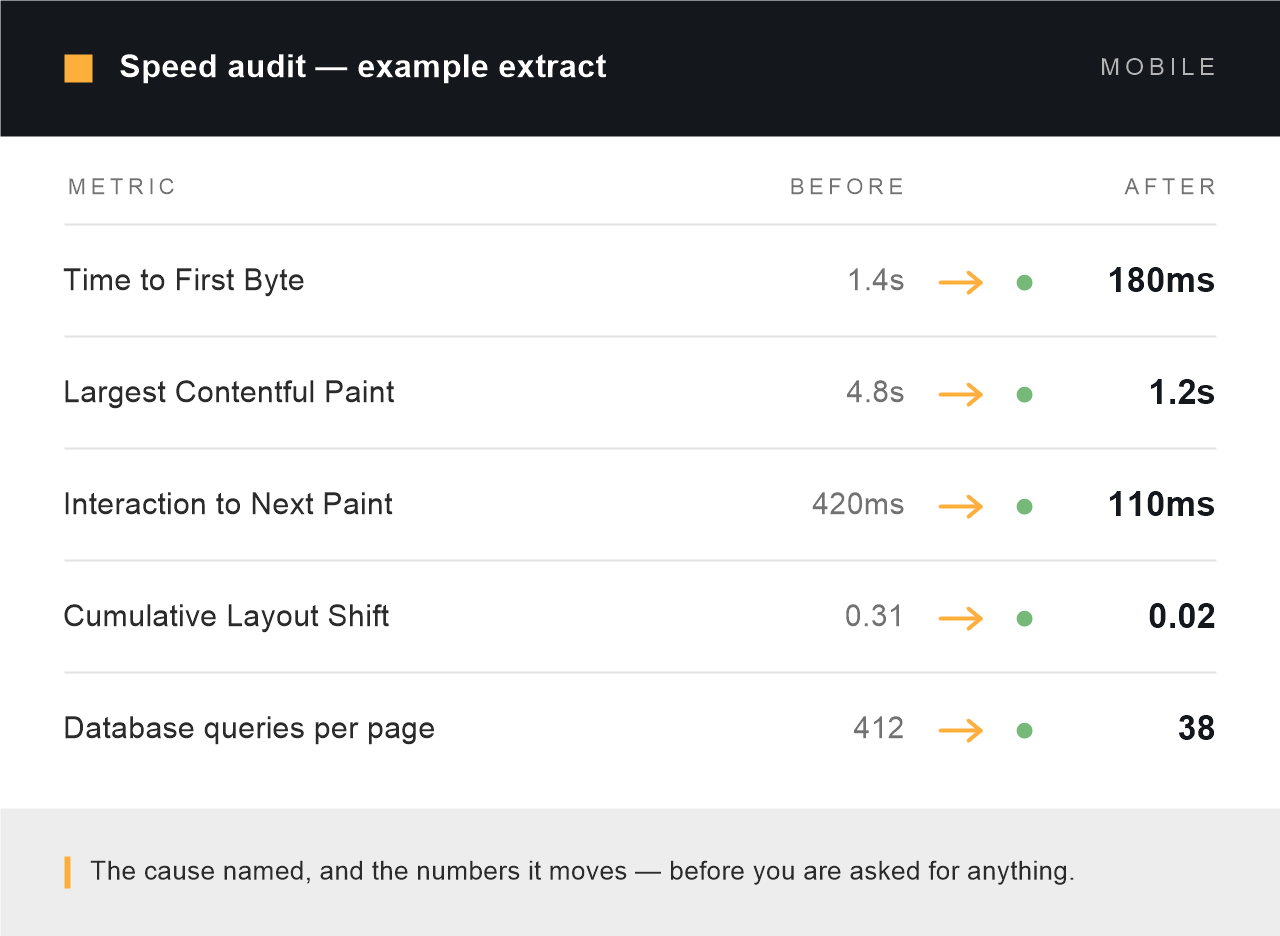
A real audit extract. The cause named, and the numbers it moves. Yours before you are asked for anything.
2.5s
Largest Contentful Paint we work to, on mobile
200ms
Interaction to Next Paint, the metric that replaced FID
0.1
Cumulative Layout Shift, so nothing jumps as it loads
$349
Starting price, fixed before any work begins
Sound familiar?
What a slow WordPress site looks like from the inside
Nobody searches for “Largest Contentful Paint” until something has already gone wrong. Most people arrive with one of these instead. Every one of them has a specific technical cause, and the audit names it.
- The site feels fine on your laptop and crawls on a phone on mobile data
- PageSpeed Insights sits in the red and the report reads like another language
- Search Console has started reporting URLs as “Poor” and rankings have drifted
- The page is blank for a second or more before anything appears at all
- The store got slower as the catalogue grew, and it is still getting worse
- You have installed three caching plugins and none of them changed anything
- Your host says it is the site; your developer says it is the host
The work itself
Six places WordPress loses its time
A speed job is not a checklist applied blindly. We profile your install first, then spend the time where the milliseconds actually are. On most sites two of these six account for nearly all of the problem.

Server response time
If Time to First Byte is over 800ms, nothing you do to the front end will save the page. We measure TTFB from the regions your customers are actually in, check PHP version and worker limits, and separate a slow host from a slow application — because the fix is completely different.

Database and queries
We profile every query the page runs. Unindexed meta lookups, plugins querying in a loop, autoloaded options that have grown to megabytes, expired transients nothing clears. This is where old WooCommerce stores lose most of their time, and it is invisible to every front-end testing tool.

Images and media
Modern formats, correct dimensions, real responsive sizes, and the hero image loaded eagerly instead of lazily — lazy-loading your LCP element is one of the most common self-inflicted wounds we find. Usually the single biggest win on a content or brochure site.

Render-blocking CSS and JavaScript
A typical WordPress page loads stylesheets and scripts for plugins that are not used on it. We work out what each page genuinely needs, stop the rest from loading there, and get critical styles delivered first — rather than minifying everything and calling it optimisation.

Caching, configured once and properly
Page cache, object cache and browser cache each solve a different problem, and stacking plugins that all try to do all three is why sites break. We configure one layer correctly, with the cart, checkout and logged-in pages excluded so nothing goes stale where it matters.

Fonts and third-party scripts
Web fonts hold up text rendering; chat widgets, heatmaps and tag managers hold up everything. We self-host fonts, subset them to the characters you use, and get the third-party scripts loading in a way that does not block the page. You keep the tools — they just stop being first in the queue.
The three metrics Google measures
Core Web Vitals, in plain language
Google scores three things from real visits to your site, not from a test you run yourself. Passing all three on mobile is the target. Here is what each one is, what usually breaks it on WordPress, and what we change.
| Metric | What usually breaks it on WordPress | What we change |
|---|---|---|
| LCP Largest Contentful Paint — how long until the main content appears. Good is under 2.5 seconds. | A lazy-loaded hero image, an uncompressed banner, a slow server response, or a font that delays the headline. | Serve the hero eagerly at the right size and format, cut TTFB, and preload what the page needs first. |
| INP Interaction to Next Paint — how quickly the page responds when someone taps or clicks. Good is under 200 milliseconds. | Heavy JavaScript from sliders, page builders, chat widgets and tag managers all competing for the main thread. | Remove scripts the page does not use, defer the rest, and break up the long tasks that block input. |
| CLS Cumulative Layout Shift — how much the page jumps around while loading. Good is under 0.1. | Images and ads without reserved space, late-loading fonts, cookie banners injected above the content. | Reserve dimensions for every media element, load fonts without a swap jump, and place late elements so nothing moves. |
Field data updates on a rolling 28-day window, so Search Console takes a few weeks to reflect the work even when lab scores move the same day. We tell you this before you start, not after.
Included as standard
What comes with every speed job
Not tiers, not upsells. These apply whether the job lands at $349 or ten times that.
- Measured on mobile, not just desktop. Desktop scores flatter every site. Mobile is what Google ranks on and what your customers use.
- Field data as well as lab scores. We check what real visitors experienced, not only what a test bench reports on a fast connection.
- Staging first. Every change is built and tested on a copy. Your live site is never the experiment.
- Your plugins keep working. We test forms, cart, checkout and search after every change, not just the homepage score.
- A before-and-after report. TTFB, LCP, INP, CLS, query counts and page weight, measured the same way both times.
- Plain-language documentation. What changed, why, and what your next developer needs to know to avoid undoing it.
- Nothing rebuilt without asking. If your theme or builder is the real problem we say so and price it separately — we do not quietly start over.
- Thirty days of support after handover. If something we touched breaks, we fix it. No charge, no argument.
How it works
Diagnosis first, price second, work third
01 — Free written audit
You send a URL. We profile the site from the outside, and from inside the admin if you give us temporary access. You get a written document naming the bottleneck, what it is costing in seconds, and what fixing it involves. Yours to keep either way.
02 — Fixed price
One number in USD, agreed before anything starts, with the scope in writing. Most speed jobs land between $349 and $1,200. If the audit shows yours needs less than you feared, the price goes down — that happens more often than you would expect.
03 — Work, retested and handed over
Changes built on staging, tested against the whole site rather than one page, then deployed. You get the before-and-after numbers, the documentation, and thirty days of support while the field data catches up.
Scope, honestly
What speed work cannot fix
Some slow sites are slow for reasons no amount of optimisation will solve. If yours is one of them we say so in the audit — before you pay us — and tell you what would actually work instead.
- Oversold shared hosting — we will tell you to move host rather than take your money twice
- Three page builders stacked on top of each other; that is a rebuild, not a tune-up
- Autoplaying background video the marketing team will not give up
- Third-party scripts you are contractually required to run
- “Get me 100 out of 100” — the score is a proxy, load time is the goal, and we optimise for the second
- Slowness that turns out to be malware; that is a different job and we will say so
Common questions
WordPress speed optimization, answered
How much does WordPress speed optimization cost?
From $349. That is the floor for a standard site — a business or content site with a normal plugin load. Larger WooCommerce stores and multi-language installs usually land between $600 and $1,200 because there is more to profile and more to test afterwards. The free audit turns the floor into one real number before you commit, and you see it in writing.
How long does it take?
The audit comes back within two business days. The work itself is usually three to five working days for a standard site, longer for a store where checkout needs careful testing. Sites that are effectively down get looked at the same day — say so in your message.
Can you guarantee a 90+ PageSpeed score?
No, and be careful with anyone who does. The score is a weighted summary of lab measurements on a simulated device; it can be gamed in ways that make no difference to a real visitor. What we commit to is passing Core Web Vitals on mobile where the site’s hosting and build allow it, and to showing you the before-and-after measurements either way. If the audit says a green score is not achievable without a rebuild, you will read that in the audit rather than discover it after paying.
Will you break my site, my theme or my page builder?
Everything is built and tested on a staging copy first, and we test the whole site — forms, cart, checkout, search, logged-in views — not just the score on the homepage. We work with Elementor, Divi, WPBakery, Beaver Builder and Bricks sites regularly. We will not rip out your builder as part of a speed job; if it is genuinely the bottleneck we tell you and price that separately.
Do I need to change hosting first?
Usually not. Most slow WordPress sites are slow because of the application, not the server, and we can prove which one yours is in the audit. When the host genuinely is the ceiling we say so plainly, and we would rather you spent that money on a migration than on optimising a site that will still be slow afterwards.
Does site speed actually affect Google rankings?
Core Web Vitals are a confirmed ranking signal, but a modest one — relevant content still wins over a fast empty page. The larger effect is commercial. Slow pages lose visitors before they see anything, and on stores that shows up directly in checkout completion. We treat rankings as a benefit of the work rather than the reason for it.
My WooCommerce store gets slower as the catalogue grows. Is that this service?
Yes, and it is one of the most common jobs we take. Stores that degrade with catalogue size are almost always losing time in the database — unindexed product meta, plugins querying inside loops, an autoloaded options table that has grown unchecked. That is diagnosed as part of the speed audit. If the fix turns out to need custom development rather than tuning, we quote it under WooCommerce Development and tell you why.
Will it stay fast after you hand it over?
Speed decays. New plugins, new images and untested updates all add weight back. The documentation we hand over explains what to watch, and the changes are made so an ordinary content update will not undo them. If you would rather it was monitored for you, that is what WordPress Maintenance & Care covers.
Do you work with clients outside India?
Almost all of our work is for clients in the United States, United Kingdom, Australia and the EU. We are based in Rajpura, Punjab and keep hours that overlap US Eastern, UK and Australian business days. Prices are quoted and invoiced in USD.
Send us the URL. We will tell you what is slowing it down.
A written audit with the bottleneck named, the numbers behind it, and one fixed price — no sales call, no obligation, no retainer pitch.