
Moving a live site
WordPress Migration
New host, new domain, HTTP to HTTPS, or off Wix and Squarespace onto WordPress. The new site is built, synced and tested before anything points at it, so visitors never see a gap.
Tell us where the site is now and where it needs to go. You get a written migration plan back with the cutover sequence, the redirect map, the rollback path and one fixed price — before anything is touched.
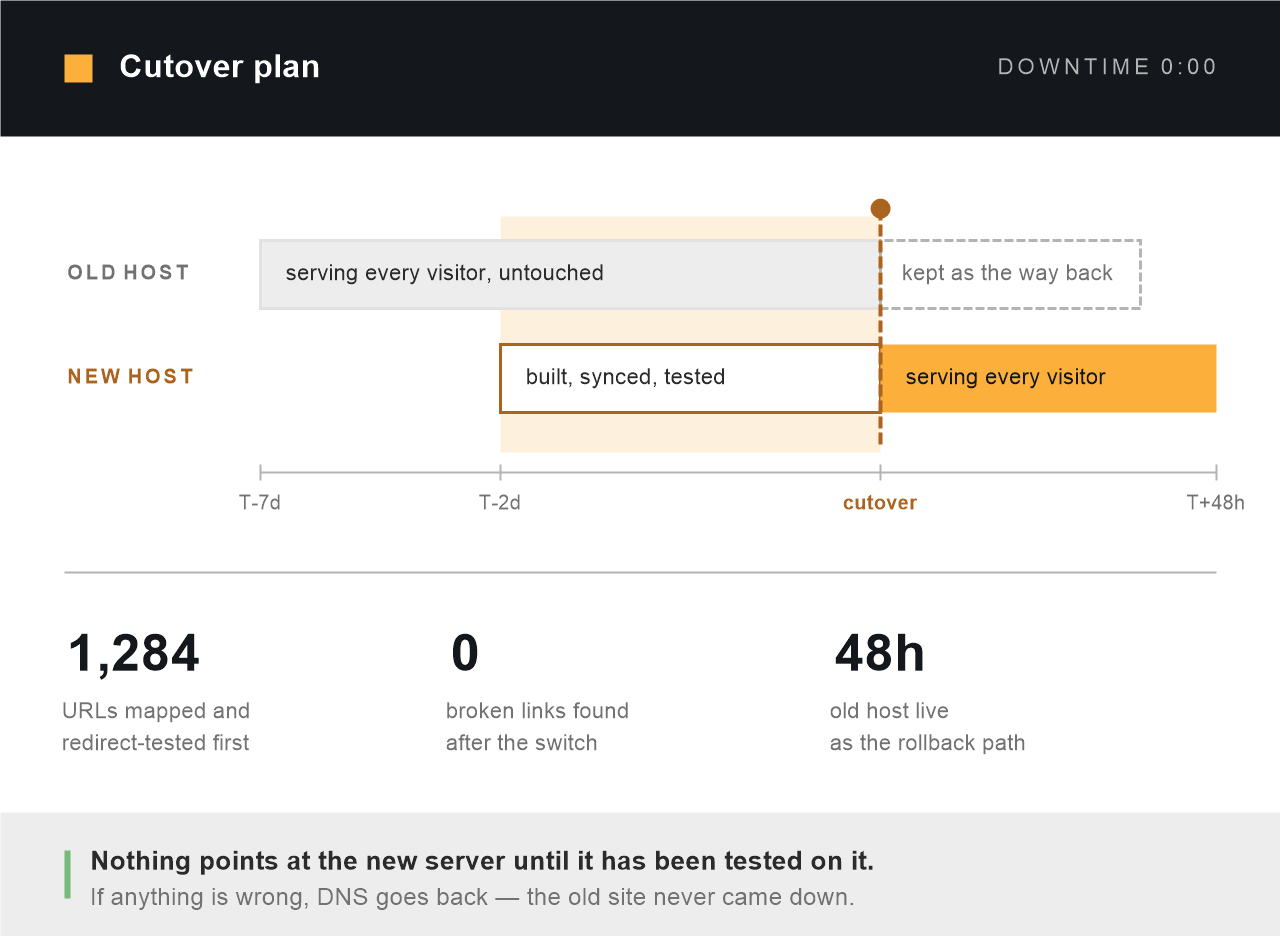
The two hosts overlap on purpose. That overlap is what makes the switch reversible.
$299
Starting price, fixed before any work begins
0:00
Downtime, because the new host is live before DNS moves
48 hours
Old host kept running as the way back
Every URL
Mapped and redirect-tested before the switch, not after
Sound familiar?
When the site has to move and cannot break
Migration is one of the few jobs where the failure is public and immediate. Everything is fine, and then for six hours it is not, and the people who notice first are your customers.
- Your host has put the renewal up, or the support has quietly got worse
- You are rebranding and the whole site has to move to a new domain
- The site is on Wix or Squarespace and you have outgrown what it will let you do
- Someone tried a migration plugin, it timed out halfway, and now there are two half-sites
- The last move cost three days of traffic and nobody wants to repeat it
- You are still on HTTP and browsers are now warning visitors about it
- The developer who holds the hosting account is no longer contactable, and nobody is sure which company it is with. Our free hosting checker finds the current hosting provider in seconds
- The site is finished on staging and nobody wants to be the one to press launch
The work itself
What a migration actually involves
Copying the files and the database is the easy part, and it is where most migrations stop. The rest of this list is where they go wrong.

The move itself
Files, database, uploads, cron jobs, certificates and server configuration, rebuilt on the new host rather than dumped there. PHP and MySQL versions checked against what your plugins actually support, because a migration is the moment those mismatches surface.

Proving nothing was lost
Post, page, product, order and media counts compared old against new, not eyeballed. Forms submitted, logins tested, search run, checkout completed. Serialised data rewritten properly — the classic migration bug is a find-and-replace that corrupts every widget and theme setting at once.

The redirect map
If any URL changes, every old address gets a 301 to its real equivalent — not a blanket redirect to the home page, which search engines read as a soft 404 and which loses the ranking you were trying to keep. The map is built from your live URL list and tested before the switch, not after.

The cutover
TTL lowered days ahead so the switch propagates in minutes rather than hours. The new site is already answering on its own address and fully tested before DNS changes. During propagation both hosts serve the same content, so it does not matter which one a visitor reaches.

A way back
The old host stays live and paid for forty-eight hours after the switch. If something only shows up under real traffic, DNS goes back and the old site is still there, unchanged, still holding the data. A migration without a rollback path is not a plan, it is a hope.

Keeping the rankings
Robots and noindex checked before launch — the single most common launch failure is a staging site going live still blocking search engines. Sitemaps resubmitted, the change of address filed in Search Console where a domain moved, and crawl errors watched for two weeks afterwards.
Not all moves are equal
Which kind of move is yours
The word “migration” covers jobs with very different risk. Knowing which one you are asking for tells you how much of this price is copying and how much is care.
| The move | Where the risk sits | What it means for you |
|---|---|---|
| Same domain, new host | Low | No URL changes, so no redirects and nothing for search engines to relearn. Done properly this is invisible to visitors and to Google. |
| Staging site going live for the first time | Low, but easy to fluff | No redirects needed. The failure is almost always the noindex flag left switched on, which quietly keeps the new site out of Google for weeks. |
| HTTP to HTTPS | Medium | Certificate, forced redirects, and every hardcoded internal URL rewritten. Miss one and browsers flag the page as insecure over a single image. |
| Subdomain to root, or folder to root | Medium | Every URL changes, so the redirect map is the whole job. Get it right and rankings carry across. |
| New domain name | High | A full 301 map plus a change of address in Search Console. Expect a few weeks of movement while Google reassigns authority. This is normal and it recovers. |
| Wix, Squarespace or Shopify to WordPress | High | Not a copy at all — content is extracted and the site is rebuilt, and those platforms use their own URL patterns. The redirect map is what protects the traffic you already have. |
| Multisite split into a standalone install | High | Shared users, shared uploads and shared tables all have to be untangled cleanly. Slow, careful work rather than difficult work. |
| A migration somebody else abandoned halfway | Depends | We work out which of the two sites is the real one before touching either. Common, fixable, and the free plan will tell you honestly what it costs. |
Included as standard
What comes with every migration
Not tiers, not upsells. These apply to a $299 host move and a multisite untangle equally.
- A written migration plan first. The cutover sequence, the redirect map, what could go wrong and what we would do about it. Yours to keep whether or not you hire us.
- A full backup of the old site before anything starts. Held off both hosts, and handed to you at the end regardless of outcome.
- The new site tested before DNS moves. Every template, every form, checkout if you have one — on the new server, on its real address.
- Zero planned downtime. Both hosts serve the same content through propagation, so there is no window to sit through.
- Forty-eight hours of rollback. The old host stays live and untouched, so the switch is reversible in minutes.
- Cutover at your quietest hour. Chosen from your analytics, not from our calendar. Overnight for your market is daytime for us.
- Two weeks of watching afterwards. Crawl errors, 404s and Search Console checked once the real traffic arrives, not just on launch night.
- Everything in your own accounts. Your hosting, your domain, your registrar. We work inside them and hand back full access.
How it works
Plan first, build second, switch third
01 — Free migration plan
Tell us where the site lives now and where it needs to go. Within two business days you get the sequence in writing: what moves, what changes, which URLs need redirects, where the risk is, and what the rollback looks like. Yours to keep either way.
02 — Built and verified
The new site goes up on the new host and runs on its own address while the old one carries on untouched. Counts compared, forms submitted, checkout completed, redirects tested. You get a link and check it yourself before anybody talks about switching.
03 — Cutover and watch
TTL dropped in advance, content synced one final time, DNS switched at your quietest hour. The old host stays live for forty-eight hours. Then two weeks of watching crawl errors and 404s while the real traffic finds the new site.
Scope, honestly
What moving the site will not fix
A migration changes where the site runs. It does not change what the site is, and a good deal of migration work gets sold on the quiet suggestion that it does.
- A slow site does not become fast on better hosting. Hosting is usually a fraction of the problem — the rest is speed optimization, from $349
- An infected site migrates its infection perfectly. It gets cleaned first — malware removal, from $199
- Moving will not recover rankings the site has already lost for other reasons
- Redesigning, rewriting content and changing domain at the same time — do them in sequence, or nobody can tell you which one caused the drop
- Hosts that block SSH, SFTP or direct database access. We will tell you before you buy, not after
- Migrations off WordPress onto another platform. We only move sites in the WordPress direction
Common questions
WordPress migration, answered
How much does a WordPress migration cost?
From $299. That covers a straightforward move to a new host on the same domain, including the plan, the verification and the rollback window. A domain change, an HTTPS move or a rebuild off Wix or Squarespace costs more because the redirect map becomes the bulk of the work. The free migration plan turns the floor into one fixed number before anything is touched.
Will my site go down during the migration?
No planned downtime. The new site is fully built and serving on the new host before DNS changes, so during propagation both hosts answer with the same content and it does not matter which one a visitor reaches. What we ask for is a short freeze on content edits around the cutover, so nothing is written to the old site after the final sync.
Will I lose my Google rankings?
If the domain and URLs stay the same, there is nothing for Google to relearn and rankings do not move. If URLs change, a complete 301 map carries the authority across — the losses people describe almost always come from redirecting everything to the home page, or from missing the noindex flag. Expect a few weeks of movement after a domain change; that is normal and it recovers.
How long does a migration take?
The plan comes back within two business days. A same-domain host move is usually done inside a week, most of which is the new site sitting built and tested while we wait for the DNS TTL to lower. Domain changes and platform rebuilds run two to four weeks, because the redirect map has to be built from your real URL list and checked line by line.
Can you move my site from Wix, Squarespace or Shopify to WordPress?
Yes, and it is worth being clear that this is a rebuild rather than a copy — those platforms do not let you export a working site. Content and images are extracted, the site is rebuilt in WordPress, and every old URL is mapped to its new equivalent. If you have a design ready for it, that part is Figma to WordPress; if not, we can build to the structure you already have.
What happens to my email?
Email is a separate service from website hosting even when the same company sells you both, and it is the most common thing to break during a move. We identify your MX and mail records before touching anything, carry them across unchanged, and confirm mail is flowing after the switch. If your email is bundled with the old host, we will tell you that before you cancel it.
Do you handle HTTP to HTTPS and domain changes?
Yes, and they are usually cheaper done as part of a move than on their own. HTTPS means the certificate, a forced redirect, and rewriting every hardcoded internal URL — including the ones inside serialised theme settings that a plain find-and-replace corrupts. A domain change adds the full redirect map and the change of address filing in Search Console.
What if something goes wrong after the switch?
The old host stays live and unchanged for forty-eight hours, so pointing DNS back takes minutes and the old site is exactly as it was. That window exists because some problems only appear under real traffic. We also watch crawl errors and 404s for two weeks afterwards and fix what surfaces, at no extra charge.
Can you migrate a WooCommerce store that takes orders daily?
Yes, and the sequencing matters more than for any other site, because orders and stock keep changing while the copy is being made. We take a final delta sync of orders, customers and stock immediately before the switch, and agree a short window where the store stays open but we know exactly which orders landed where. Payment gateways are re-authorised on the new host and tested with a live transaction before cutover.
Do you work with clients outside India?
Almost all of our work is for clients in the United States, United Kingdom, Australia and the EU. For migrations the time difference is an advantage rather than a problem — your quietest hour is our working day, so the cutover happens with people awake and watching. We are based in Rajpura, Punjab and quote in USD.
Tell us where the site has to go.
You get a written migration plan back with the cutover sequence, the redirect map, the rollback path and one fixed price. No sales call, no obligation.