
Malware removal & hardening
WordPress Malware Removal
Spam redirects, injected scripts, blacklist warnings, admin accounts nobody created. We clean the install, find how they got in, and close it — so you are not paying someone to do the same job again in six weeks.
Send a URL. You get a written scan back with what is infected, how it happened, and one fixed price before you commit. Sites that are down, suspended or flagged by Google get looked at the same day — say so in your message.
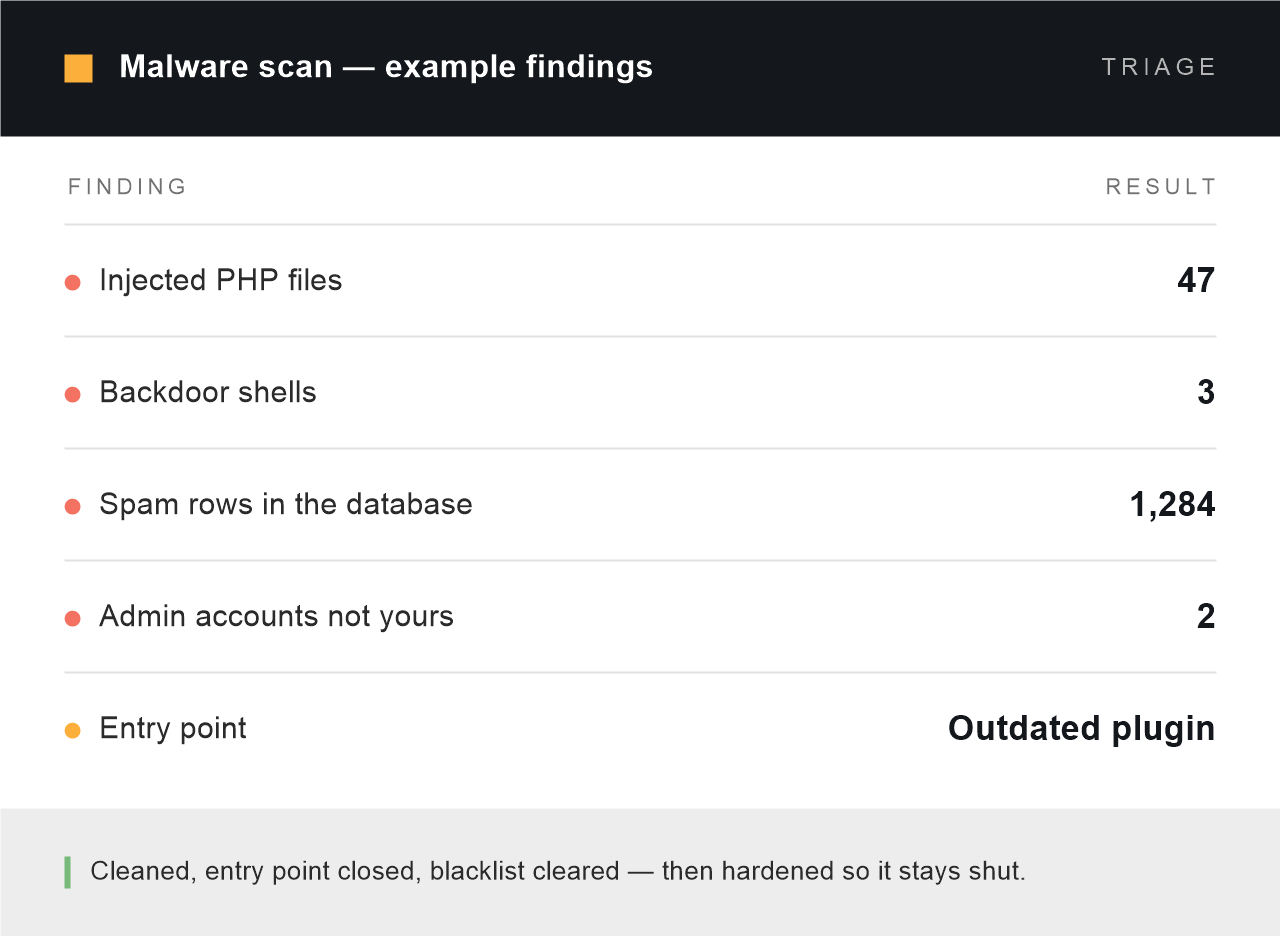
What the first day looks like: everything found, and the way in named. Yours before you are asked for anything.
Same day
Start for sites that are down, suspended or blacklisted
48h
Typical clean, hardening and handover on a standard site
Entry point
Found and closed, not just the infected files deleted
$199
Starting price, fixed before any work begins
Sound familiar?
What a hacked WordPress site looks like
Most infections are built to stay hidden from the site owner and visible to everyone else. If you recognise any of these, treat it as confirmed rather than possible — and stop updating plugins until someone has looked, because that can destroy the evidence of how they got in.
- Google shows “This site may be hacked” under your listing
- Visitors arriving from search land on pharma, casino or crypto pages
- The site looks perfectly normal to you and spammy to Google’s crawler
- Your host has suspended the account or quarantined files without much explanation
- Administrator accounts appear that nobody created
- Redirects that only fire on mobile, or only on the first visit
- Customers say your emails now arrive in their spam folder
- Files in the install have modification dates nobody can account for
The work itself
What a malware clean actually involves
Deleting infected files is the easy part and the least useful. If the way in stays open, the site is reinfected within days — usually by the same automated scanner that found it the first time.

A full scan, files and database
Core files compared against the official checksums, themes and plugins against their release versions, and the database read for injected rows, rogue options and spam content. Most scanners check files and stop there, which is why infections survive a “clean”.

Cleaning, not deleting
Infected core and plugin files are replaced from clean sources. Where malicious code has been injected into files that are genuinely yours — a custom theme, a bespoke plugin — we strip the injection and keep your work. Nothing is deleted wholesale to make a scanner go quiet.

Finding the entry point
Access logs, file modification times and the infection’s own timestamps usually tell you exactly which component was exploited and when. This is the part that decides whether the clean holds, and it is the part most cheap fixed-price services skip entirely.

Blacklist and reputation recovery
Once the site is verifiably clean we submit the review requests — Google Safe Browsing through Search Console, plus the other blacklists that quietly affect email delivery and browser warnings. We handle the submissions and tell you what to expect, rather than leaving you to work out the forms.

Hardening what was open
Credentials rotated, unused accounts removed, file permissions corrected, PHP execution blocked in the uploads directory, version fingerprints removed, and the specific hole that was used closed properly. Included in the price — it is the work, not an upsell.

Watching it afterwards
Reinfection, when it happens, almost always happens in the first month. File integrity monitoring stays on for thirty days after handover and we check the site rather than waiting for you to notice. If it returns in that window, fixing it is our problem, not another invoice.
How they get in
Where WordPress infections actually come from
Almost none of it is targeted. Automated scanners sweep the whole internet for known holes and take whatever opens. That is good news: the same handful of causes account for the overwhelming majority of hacked WordPress sites, and all of them are closable.
| How they get in | How it shows up | What we change |
|---|---|---|
| An outdated plugin or theme with a published vulnerability | Injected files appear across the install within hours of an exploit becoming public. By far the most common cause. | Patch or replace the component, remove the version fingerprints that let scanners find you, and check what else it touched. |
| Nulled or cracked premium plugins | The backdoor arrived in the download. The site was compromised from the day it was installed, not from an attack. | Remove it. Install a licensed copy or a maintained alternative, and audit for whatever it installed while it sat there. |
| Reused or weak administrator passwords | A successful login from an unfamiliar country and no other trace — nothing was broken, someone simply logged in. | Force a credential reset, add two-factor authentication, rate-limit login attempts and rename the login endpoint. |
| A compromised hosting account, or a neighbouring site on it | Reinfection within days of a clean, arriving from outside WordPress entirely. | Escalate to the host with evidence, check every site on the account, and isolate or move the install if the account cannot be trusted. |
| Stolen FTP or SFTP credentials | Files change with no matching WordPress activity in the logs — often from an infected machine in your own office. | Rotate keys, move to SFTP with key authentication, delete unused accounts and restrict access by address. |
| File permissions that let the web server write anywhere | PHP files appearing and executing inside the uploads directory, where only media should live. | Correct ownership and permissions, and block PHP execution in uploads at the server level. |
Included as standard
What comes with every clean
Not tiers, not upsells. These apply whether the job lands at $199 or several times that.
- A written scan before any money changes hands. What is infected, how it got in, and what cleaning it involves. Yours to keep whether or not you hire us.
- A full backup taken first. Before we touch anything, so there is always a way back — including back to the infected state if evidence is needed.
- Your content, products and orders preserved. Cleaning a database is not the same as emptying it. Nothing of yours is discarded to save time.
- The entry point named in writing. Not “malware was found and removed” — the actual component, the actual hole, and the date it was used.
- Blacklist review requests submitted for you. Google Safe Browsing and the other lists that affect browser warnings and email delivery.
- Hardening included, not sold separately. Closing the hole is part of the job. A clean without it is a temporary clean.
- Plain-language documentation. What happened, what we changed, and what to tell your customers if you need to.
- Thirty days of monitoring and support. If it comes back in that window we deal with it. No charge, no argument.
How it works
Diagnosis first, price second, work third
01 — Free written scan
You send a URL and tell us what you are seeing. We scan from outside and, with temporary access, from inside. You get a written document: what is infected, how far it has spread, and how it most likely got in. Yours to keep either way.
02 — Fixed price
One number in USD, agreed before anything starts. Most cleans land between $199 and $600. A store, a multisite, or an infection that has been sitting there for months costs more because there is more to check — and you see that number before you decide.
03 — Clean, close, hand over
Backup, clean, close the entry point, harden, then submit the blacklist reviews. You get the before-and-after scan results, documentation of what happened, and thirty days of monitoring while the warnings clear.
Scope, honestly
What a clean cannot undo
A compromise is not only a technical problem, and some of it is outside what any developer can fix. We would rather say this before you pay than after.
- Data that has already left the server — we can tell you what was exposed, we cannot un-expose it
- Ransomware negotiation or payment, under any circumstances
- Sites with no backup and a deliberately wiped database; sometimes there is genuinely nothing left to recover
- Reinstalling nulled plugins after the clean — we will not do it, and we will not support a site that does
- “Just make the Google warning go away” without closing the hole; it returns within the week
- Breach notification and regulatory reporting — that is your legal counsel’s work, not ours
Common questions
WordPress malware removal, answered
How much does WordPress malware removal cost?
From $199. That covers a standard site with a single infection and a findable entry point. Stores, multisite networks and infections that have been sitting there for months usually land between $350 and $600, because there is more to check and far more to test afterwards. The free scan turns the floor into one real number before you commit.
My site is down or suspended. How fast can you start?
Same day. Sites that are offline, suspended by the host or showing a Google warning go to the front of the queue — say so in your first message and we will look at it that day rather than in the normal two-day scan window. Most cleans are finished and handed back within forty-eight hours of the price being agreed.
Will I lose my content, my products or my orders?
No. Cleaning a database means removing what was injected, not replacing the database with a fresh one. Your posts, pages, products, customers and orders stay. We take a full backup before touching anything, so there is always a way back — and if a file is genuinely yours and merely infected, we strip the injection rather than deleting your work.
Do you find out how they got in, or just clean the files?
We find out. It is the difference between a clean that holds and a clean that lasts a fortnight. Access logs, file timestamps and the malware’s own artefacts usually identify the exploited component and the date it was used, and that goes in the written handover. If the evidence genuinely does not survive — some hosts keep only a few days of logs — we say so plainly and harden every plausible route instead of guessing at one.
Google has flagged my site. How long until the warning is removed?
Once the site is verifiably clean we submit the review through Search Console, and Google typically lifts a Safe Browsing warning within one to three days. Host suspensions usually clear faster because we can send the host the evidence directly. What we cannot do is speed up a review by asking twice — submitting again while one is pending resets the queue, so we submit once and wait.
Do I need to change all my passwords?
Yes, and this is the one part we need you to do. WordPress administrators, hosting control panel, FTP or SFTP, the database user and any email account tied to them. Doing it before the clean is finished is pointless — if a backdoor is still in place the new credentials get captured too, so we rotate them as part of the handover and tell you exactly when.
Will it come back?
Not through the same door. Reinfection happens when the entry point was never found, which is why finding it is the core of the job rather than an extra. Monitoring stays on for thirty days after handover and anything that returns in that window is our problem. What nobody can promise is immunity from a vulnerability that has not been published yet — which is the argument for keeping the site maintained rather than fixing it once and walking away.
My host suspended the account. Can you deal with them?
Yes, and it is usually faster if we do. Hosts want evidence of a clean install and a closed entry point, in the form they are used to reading. We produce that and correspond with their abuse team directly. If the suspension turns out to be caused by another site on the same account, we will tell you — that is a different conversation, and occasionally a reason to move.
The site is also very slow. Is that related?
Sometimes. Cryptominers, spam mailers and injected redirect scripts all consume server resources, and sites that were only ever “a bit slow” occasionally turn out to be infected. The scan tells you which it is. If the site is clean and simply slow, that is WordPress Speed Optimization and we will say so rather than selling you a clean you do not need.
Do you work with clients outside India?
Almost all of our work is for clients in the United States, United Kingdom, Australia and the EU. We are based in Rajpura, Punjab and keep hours that overlap US Eastern, UK and Australian business days. Prices are quoted and invoiced in USD.
Send the URL. We will tell you what is on it.
A written scan with what is infected, how it got in, and one fixed price — no sales call, no obligation, no retainer pitch. Sites that are down or blacklisted get looked at the same day.